Agency Operating Guide & Master Handover Vault
Official SOP • Eric & SyarifahComplete, non-technical instructions for daily operations, system ownership, and zero-downtime emergency recovery
Complete Agency Ownership & The "Bus Factor" Guarantee
You own 100% of this software, customer database, and infrastructure. You are never held hostage.
The Plain English Guarantee:
"If anything ever happens to Haarshan (developer is traveling, sick, busy, or unreachable), Eric and Syarifah will NEVER lose control of this system. This platform was deliberately engineered to be completely independent, self-healing, and manageable entirely through straightforward buttons on your screen. You do not need any coding knowledge, server commands, or a programmer on standby to keep this running smoothly every single day."
All client records, policy files, and sent messages are stored in your private agency database container. Nobody else has access to your customer records.
The software runs inside Docker containers with auto-restart enabled. If the server ever reboots or loses power, the entire system restarts itself automatically in 15 seconds.
All accounts, hosting, and domains are registered directly to Eric's agency. There are no proprietary lock-ins, artificial time limits, or developer-only keys.
Account Roles & Responsibilities
Full control: Import new Excel master sheets, configure WhatsApp gateways, view financial metrics, manage audit trails, and approve message queues.
Daily servicing: Conducts the 9:00 AM morning check, sends VIP birthday wishes, reviews policy reminder drafts, and attaches official claim PDFs.
Visual Guide: Secure Principal Login Screen (1-Click Switch)
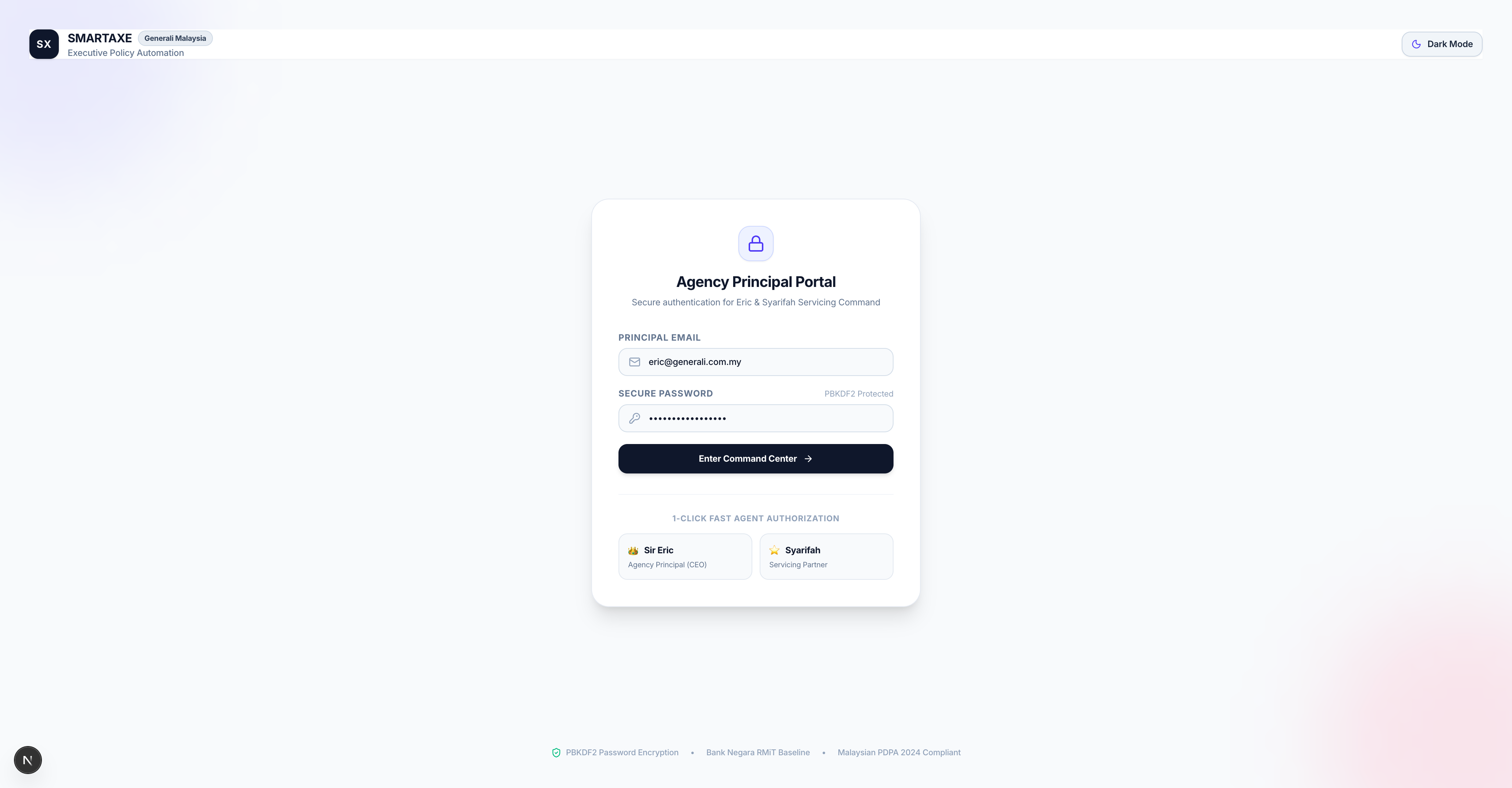
Figure 1.1: The Agency Principal Portal with 1-Click Fast Switch between Sir Eric and Syarifah.
Daily Morning Routine (Takes Less Than 3 Minutes)
A simple, 3-step morning workflow to maintain 95%+ client retention and delight policyholders.
Step 1: Check Today's VIP Birthdays (30 Seconds)
At 9:00 AM, glance at the top of your Command Center. If any clients have a birthday today, their names will automatically appear in the gold VIP Birthday Banner.
1. Click the "Review & Send Wish" button on the banner.
2. A friendly modal opens with an AI-crafted greeting tailored for an insurance client.
3. Choose the preferred language: English, Bahasa Melayu, or Chinese.
4. Click "Approve & Send Birthday Wish". The message arrives on their WhatsApp with festive emojis and warm greetings from Eric's agency!
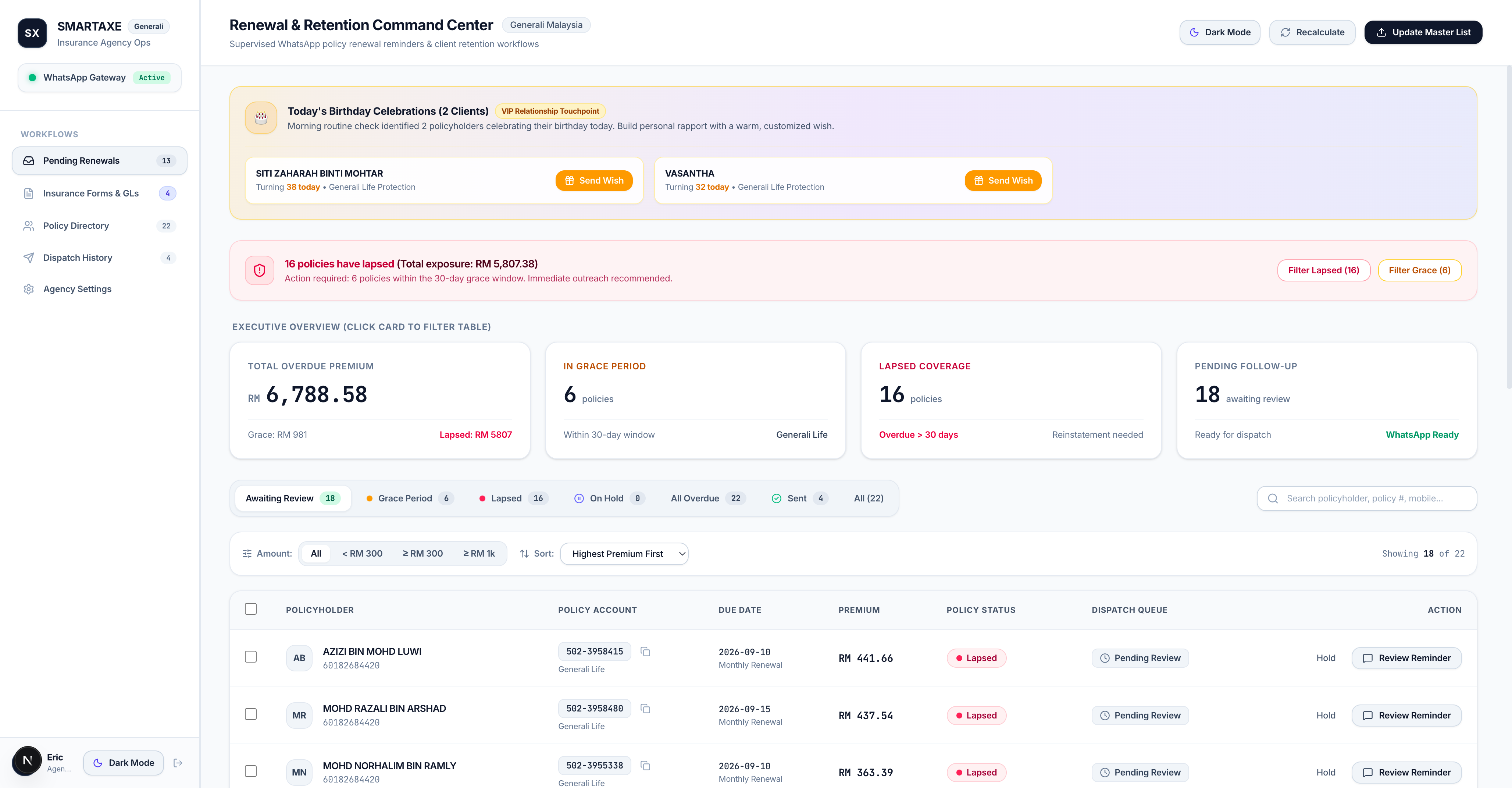
Figure 2.1: The VIP Birthday Banner at the top of the Command Center.
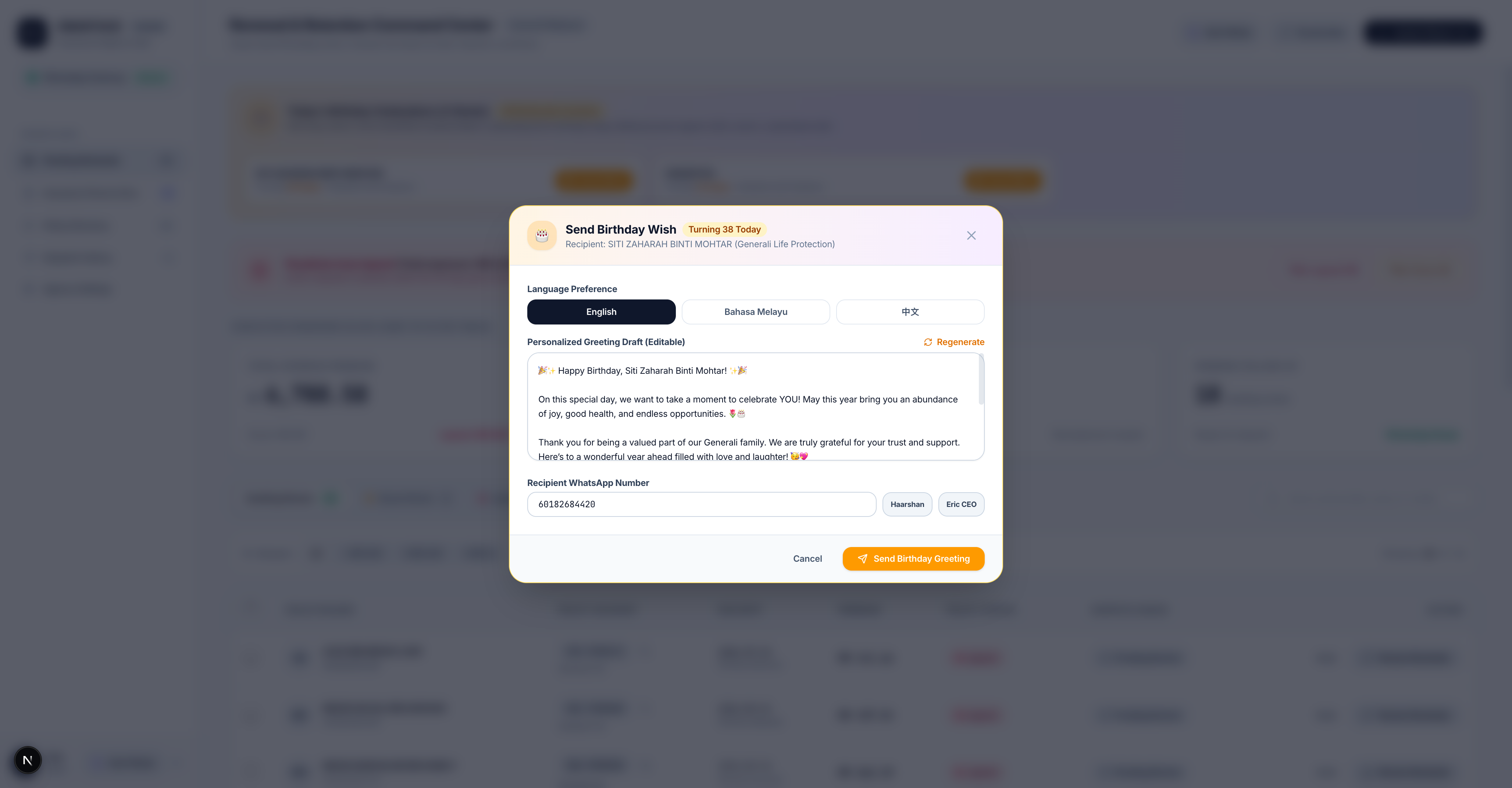
Figure 2.2: 1-Click personalized AI birthday wish generated in English, BM, or Chinese.
Step 2: Review Grace & Lapsed Renewal Reminders (2 Minutes)
Below the banner is the Policy Servicing Queue. Cards are color-coded based on urgency:
Grace Period (Due in < 30 Days)
Polite reminder with exact premium sum and Generali payment link to prevent policy lapsing.
Lapsed / Overdue (Past Grace Period)
Urgent medical protection reinstatement notice with direct agent assistance contact.
1. Click "Review Reminder" on any card to open the preview modal.
2. You can freely edit the text in the message box if you want to add a personal greeting (e.g. "Hi Uncle Tan, hope your knee is recovering well!").
3. If they need a form, choose an official Generali PDF from the dropdown (Medical Claim, GL Request, or Direct Debit).
4. Click the green "Approve & Send WhatsApp" button. The message is queued and dispatched in seconds.
Step 3: Synchronize Master Excel (Done Weekly or Monthly)
Whenever you download an updated report from the Generali agent portal, simply drag the file into the Update Master List box. The system instantly updates policy numbers, due dates, phone numbers, and birthdays without requiring manual typing.
How to Reconnect WhatsApp (If Your Agency Phone Logs Out)
Just like WhatsApp Web, Meta occasionally asks you to refresh your connection. Here is how to do it in 20 seconds.
The connection badge in your left sidebar will show ● Offline instead of ● Connected.
Click on "Agency Settings" in the left sidebar menu.
Click the blue button labeled "Restart Connection / Refresh QR".
Pick up your agency WhatsApp phone: tap Settings → Linked Devices → Link a Device.
Scan the square QR code on your computer screen. The screen turns green and displays: "Connected: Generali Agency Desk".
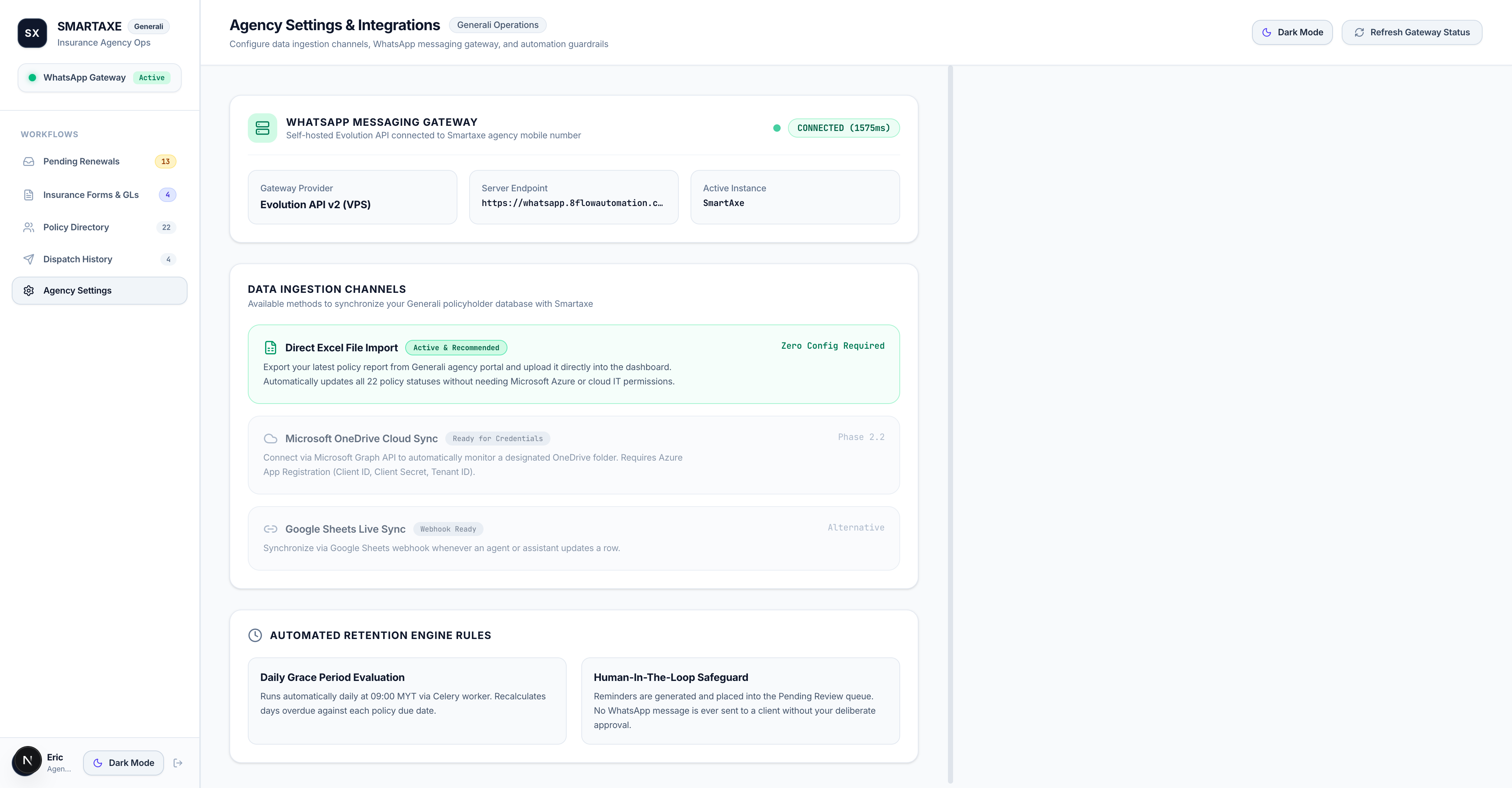
Figure 3.1: The WhatsApp Gateway connection manager in Agency Settings.
How to Update Your Master Excel List (Without Developer Help)
The platform intelligently cleans messy phone numbers and organizes columns automatically.
You do not need to format databases, write code, or edit formulas. The system natively understands your exact Generali Malaysia agency spreadsheets:
Whether your column is named POLICY NO, INSURED NAME, NO PHONE, or DOB, the system maps them with zero setup.
Numbers with dashes (012-345 6789), missing country codes (0123456789), or international prefixes (+6012...) are all automatically cleaned to WhatsApp standard.
Simply keep a column named DOB or Birthday with dates like 1985-05-14 or 14/05/1985. The morning engine handles the rest!
What Happens If a Client's Phone Number Is Missing or Wrong?
The platform will never crash. It simply labels the record as "Missing Phone" in the Clients list so Eric and Syarifah can easily see which policyholder needs a phone number update from Generali records.
PDF Document Library & Sending Claim Forms via WhatsApp
Attach official Generali hospitalization forms, guarantee letters, and autopay documents directly to messages.
Policyholders regularly ask for claim paperwork during emergencies. Instead of searching folders on your computer and sending files manually, the platform includes a built-in Official Document Library.
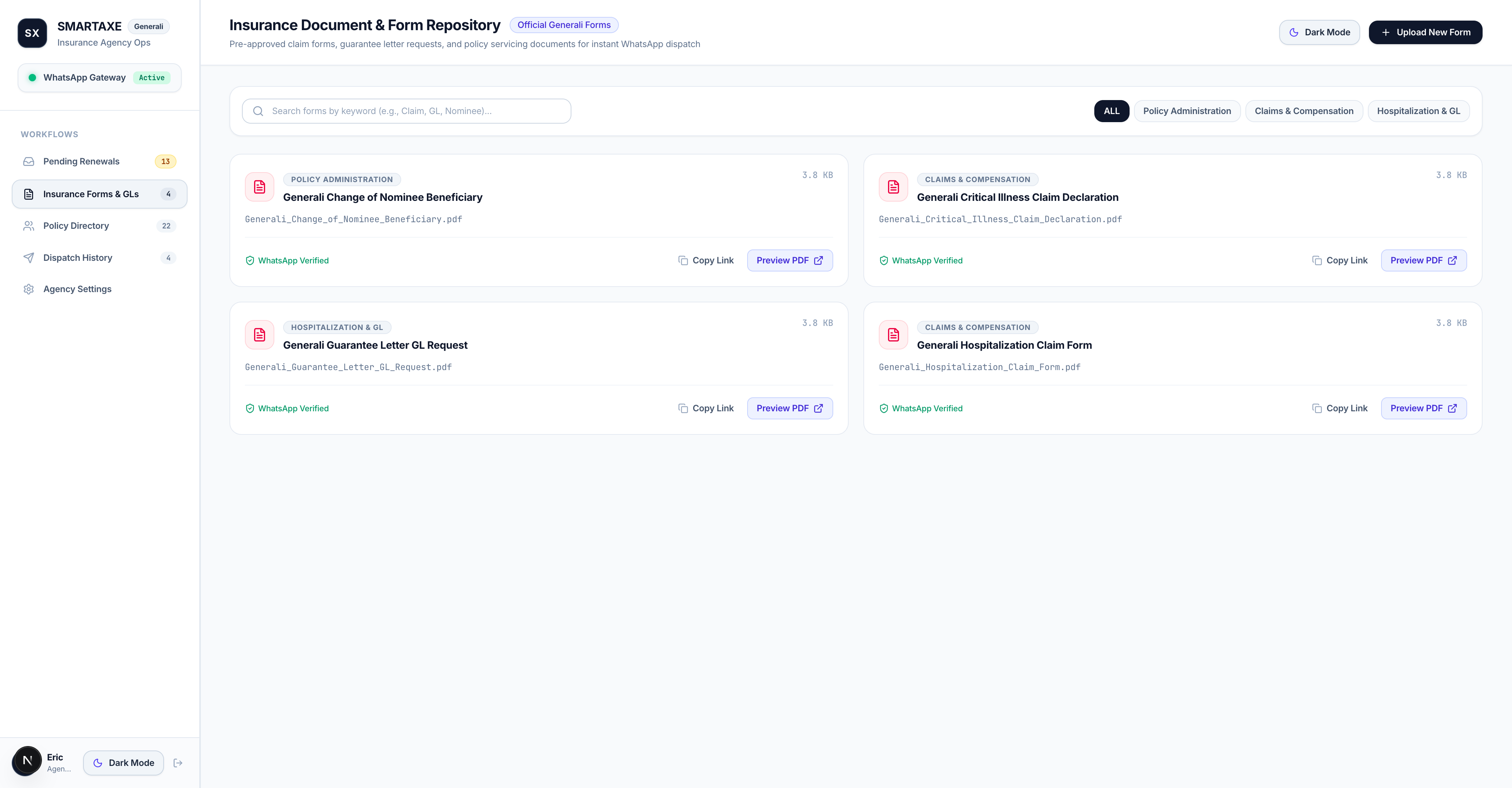
Figure 5.1: The Agency Document Repository (`/documents`) showing pre-loaded official Generali forms.
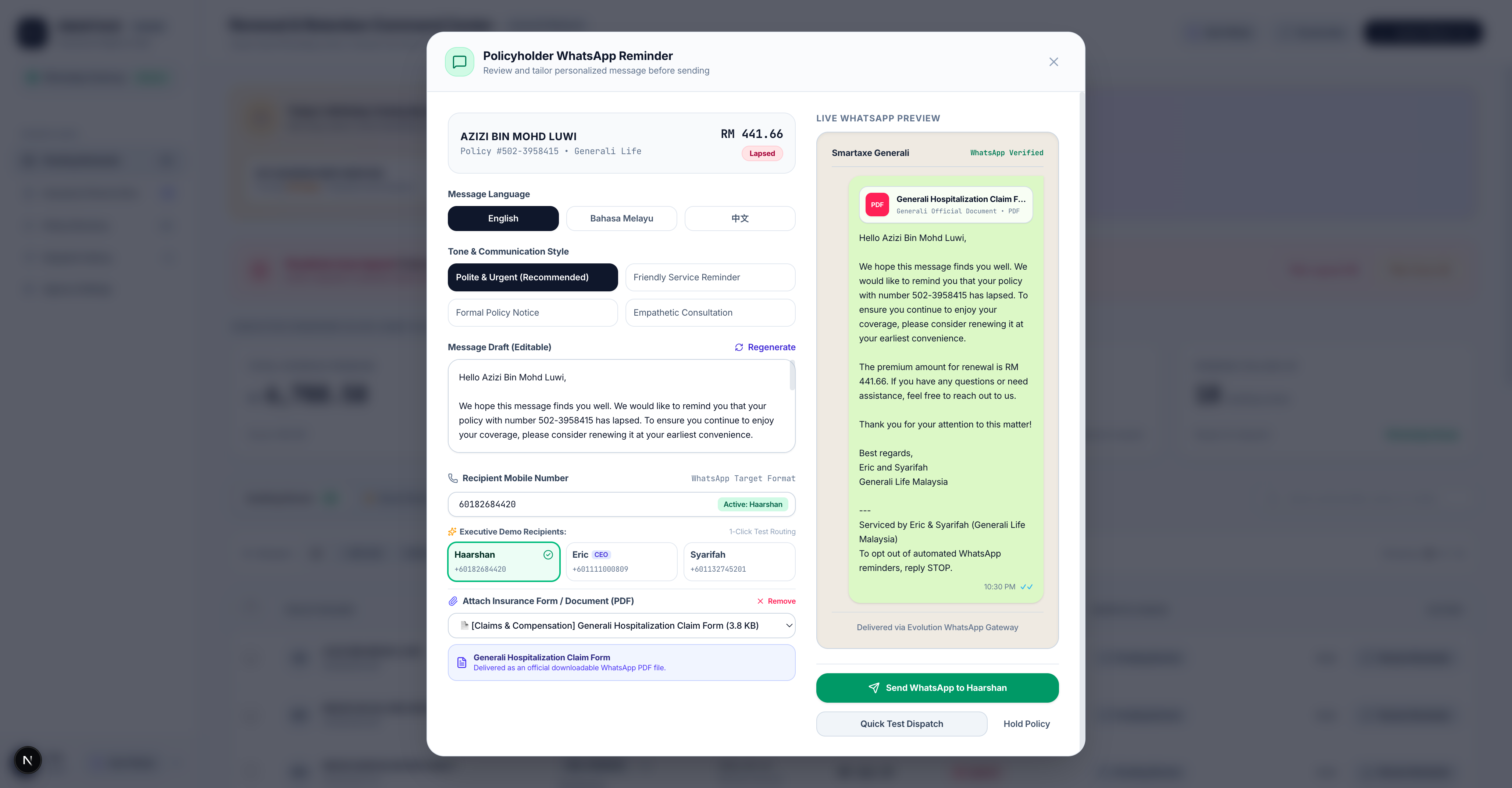
Figure 5.2: In-modal PDF attachment picker with live WhatsApp chat bubble preview.
4 Official Pre-Loaded Generali Forms:
- Generali Personal Accident & Medical Claim Form: For outpatient, inpatient, or accident claims.
- Hospital Guarantee Letter (GL) Request Form: For planned hospital admissions and cashless panel discharge.
- Direct Debit & Autopay Registration Form: To set up recurring credit card or bank deductions.
- Panel Hospital Directory & Emergency Hotlines: List of nationwide panel hospitals with 24/7 hotline numbers.
Sent Logs, Delivery Verification & Handling Customer Replies
How to verify sent messages and how customer replies flow directly to your phone.
Where Can You Verify Sent Messages?
Click "Sent Logs" in the left sidebar menu. Every single message dispatched is permanently recorded with:
- Exact date and time stamp (e.g. 20 Oct 2026, 09:14 AM)
- Client name, phone number, and policy number
- Exact message text sent (and any attached PDF document name)
- Who approved the message (Sir Eric or Syarifah)
- Status: Sent / Delivered
What Happens When a Client Replies on WhatsApp?
Because the system connects directly to your agency WhatsApp line, all replies from clients appear instantly on your agency phone just like any normal WhatsApp chat!
When a client replies (e.g., "Thanks Eric, I just paid online, please check!"), you or Syarifah can reply directly from your phone in real time. The AI never interferes with your personal customer conversations.
Emergency 1-Click Server Recovery & Automated Backups
The exact master runbook if the server ever freezes or stops loading.
Emergency Checklist (If the web page does not load):
- Open your web browser and navigate to your hosting panel (Coolify):
https://coolify.youragencydomain.com. - Log in using the master credentials saved in your physical office handover envelope.
- Click on the project named "SMARTAXE AI WORKFLOW".
- Click the big blue button: "Restart All Services".
- Wait 20 seconds. The frontend, backend, and WhatsApp engine will reboot cleanly and come back online automatically!
Automated Daily Cloud Backups
Every night at 2:00 AM, an automated script dumps the complete database (sql_app.db) and saves a fresh encrypted snapshot. Even if the physical computer server is completely destroyed, your customer data and policy history are 100% safe.
Emergency Technical Directory
Primary Developer: Haarshan Mohan (+60 18-268 4420)
Secondary Infrastructure Support: Dedicated Agency VPS Line
All root passwords, recovery tokens, and repository files are physically filed in your office vault.
Malaysian Legal & PDPA 2024 Compliance Shield
Why Eric and Syarifah are 100% compliant with Bank Negara Malaysia and the Personal Data Protection Act.
When generating messages, the AI model never receives your client's real name, IC number, or bank details. Everything is tokenized locally into placeholders like {{CLIENT_NAME}} and merged back in private server memory.
Every outbound message contains the statutory line: "To update preferences or opt out, reply STOP." If a customer replies STOP, the system marks their record as unsubscribed so no further reminders are sent.
No unsupervised AI bot can send unapproved numbers or incorrect messages to your clients. Every single message requires deliberate review and approval by Sir Eric or Syarifah.